Let the terminal suggests packages when encountering “command not found” error.
如何解決Linux打指令出現"command not found"(找不到指令/找不到命令)的問題?
會有這個問題,要嘛是執行檔不在環境變數$PATH裡面,不然就是缺了某個package嘛!可是我們還得花時間google線索,可以讓終端機自動建議要裝哪個套件嗎?
我們今天不細究你打什麼指令出現command not found,要討論的是如何讓終端機在遇到command not found的時候自動建議可用套件。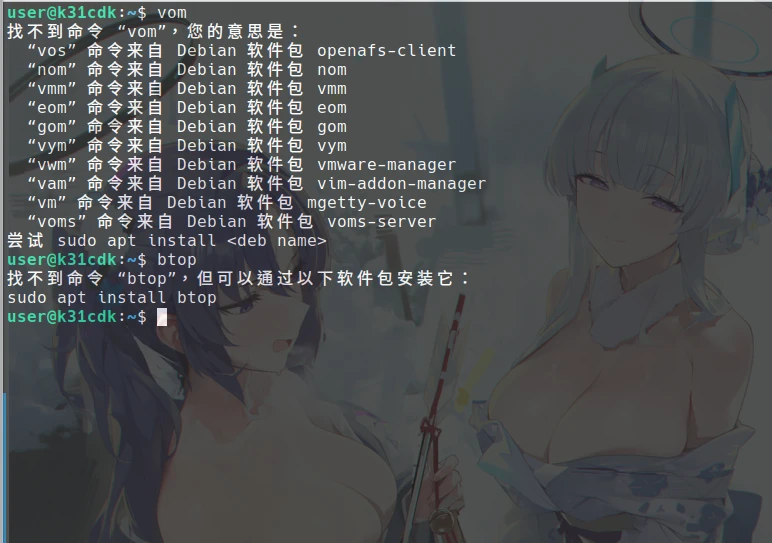
Ubuntu和Fedora幫你照顧#
最新版的Ubuntu都會預先安裝command-not-found套件,是的,這個套件就叫這個名字,幫你搜尋套件庫,提示你可以用APT裝哪個套件補足缺少的指令。它也能幫你抓指令拼字錯誤。
Fedora則是使用PackageKit-command-not-found建議可用的DNF指令。
不過在一些求精簡的發行版,如Debian、Rocky Linux、OpenSUSE、Alpine Linux,並沒有安裝這個套件,在終端機輸入的時候就直接輸出command not found。得手動安裝。
使用APT與DNF的發行版#
這個時候,手動安裝:
# Debian
sudo apt install command-not-found

# Rocky Linux
sudo dnf install command-not-found
再更新套件庫索引就可以囉。
# Debian
sudo apt update

# Rocky Linux
sudo dnf updatecommand-not-found這個工具是專為Bash設計的。如果你使用Zsh,在~/.zshrc加入source /etc/zsh_command_not_found。
使用Pacman的發行版#
Arch Linux沒有command-not-found這個套件,要安裝pkgfile這個套件,在找不到指令的時候跳出提示。
sudo pacman -S 更新它的資料庫
sudo pkgfile --update更新插入shell的hook
source /usr/share/doc/pkgfile/command-not-found.bash

source /usr/share/doc/pkgfile/command-not-found.zsh